Tampilkan postingan dengan label Advertisers. Tampilkan semua postingan

Rabu, 20 Maret 2013

GAN Blog Post: Video tips from the Google Affiliate Network Team


We’re excited to announce a new video series: “The Google Affiliate Network Minute”, featuring members of the Google Affiliate Network team sharing some basic optimization tips. In each short video, you’ll find helpful suggestions on how to get the most out of your Google Affiliate Network account. So far we’ve posted 3 videos for advertisers and 3 videos for publishers.

Publisher video content

Advertiser video content

You can find all of these videos (and more) on our YouTube channel.

Posted by: Dan Filowitz, Manager, Google Affiliate Network

Kamis, 07 Maret 2013

Announcing the Notifications tab for advertisers

A few months ago, we launched our Notifications system for publishers. Today, we’re pleased to announce the Notifications tab for advertisers. This notifications system makes it easier for advertisers to stay informed about important program changes to make the most of their affiliate marketing efforts.

Types of notifications
If you're an advertiser, starting today you’ll receive a notification whenever you have pending publishers in your account. For example, if you have over 10 pending publishers, a message will appear in your notifications reminding you to take action. You’ll also get a notification if publishers report an order that may not have tracked in your account. Other examples of the notifications you’ll receive include errors pertaining to any offline files you may have uploaded.

Accessing notifications
From the Advertiser Home, you’ll see a notification alert in the upper right corner of the interface that shows the number of pending messages. When you click the alert, you can see more information along with a link to see all notifications.

When you click the Notifications tab, you'll see a basic summary and detailed view for each communication. You can search across notifications so you can more easily review and act on these alerts while you’re working in your account.


This launch is a continuation of a series of enhancements to communications in the Google Affiliate Network interface. We've listened to feedback from both advertisers and publishers that a central communication hub could increase efficiency and reduce the need to rely on email for important communications. As we mentioned last year, our vision is to move more communications into a central location in the interface so you can better track and maintain your affiliate relationships and activities.

Send your feedback
We welcome your feedback. If you have any suggestions, let us know what you think by posting a comment here or in our forum. Advertisers, sign in to your account today to access the Notifications tab.

Posted by:
Joel Ingram, Software Engineer

Rabu, 06 Februari 2013

eFlorist grew their affiliate revenue by 40% after partnering with Google Affiliate Network

Over the past few years, Google Affiliate Network has helped advertisers and publishers grow their businesses with the right mix of technology and data insights. We’re pleased to share these stories with you on our blog.

eFlorist operates a robust network of 1,800 florists across the United Kingdom and Ireland. Consumers across the globe have an affinity for the Romsey, UK-based retailer, thanks to their e-commerce site and same-day delivery in 135 countries. With goals focused toward further capitalizing market position and affiliate program growth, eFlorist’s Marketing Manager Paul Isaia turned to Google Affiliate Network in 2012.

Paul had three key reasons in mind when transitioning the eFlorist affiliate program to Google. He wanted to grow affiliate-generated sales by 10% within one year, improve the quality of their publisher base, and leverage reporting insights to uncover new growth opportunities.

After first launching the eFlorist program with Google Affiliate Network, Paul noted that he "was very impressed with the reporting as well as the tools to recruit new affiliates." Paul focused on building publisher relationships, using the Recommendation engine to identify new affiliates, and partnering closely with the Google Affiliate Network team to make sure his program had a strong network of high-value publishers. Within a few months, eFlorist also began to use their Google Merchant Center product feed to scale their product catalog to affiliates.

While executing these initial measures, eFlorist started to see a notable sales impact in their program. Within six months, the results spoke for themselves: eFlorist’s affiliate channel revenue grew 40%, well above their initial 10% benchmark. In turn, affiliate marketing’s share of total online sales grew from 15% to 20%, satisfying Isaia and his team.

To learn more about Paul Isaia and eFlorist, read the full case study.

Posted by Will Heidrich, Account Executive

Senin, 04 Februari 2013

Go Mobile with Google Affiliate Network: Advertiser best practices

This is the third post in our ‘Go Mobile with Google Affiliate Network’ series. Today, we’ll focus on best practices to help advertisers make the most of mobile in affiliate marketing.

As we continue in our series, today, we’ll cover affiliate mobile strategies for advertisers. As a direct-response focused advertiser, you might already see the evolution of mobile and the rise of mobile e-commerce.

With more mobile devices being activated each day and two out of three smartphone users now accessing the web on their devices, today’s mobile user is primed for online conversions. Half of US smartphone users use m-commerce apps, and our research at ourmobileplanet.com points out that purchases directly via mobile continue to increase, with 35% of smartphone users having made a purchase on their phone.  

Mobile optimization tips
Visitors to a mobile or tablet site might be at a different point of the purchase funnel than visitors to a desktop site, so it's important to have an optimized site to match user intent and behavior. Plus, optimizing for mobile might also help you increase your conversion rate through all of your marketing channels, including affiliate.

We recommend reviewing the tips and best practices shared in last week’s post covering ways you can optimize your website for mobile.

In addition, it’s important that your website makes it easy for the consumer to convert and focus on information that might help conversion. You can find more tips & best practices in our GoMo Guide for advertisers at howtogomo.com.

Next, we’ll cover tips specific to affiliate marketing and mobile.

Affiliate conversion tracking
Advertisers using affiliate marketing must always ensure conversion tracking functions as expected. Google Affiliate Network advertisers are required to successfully implement and track conversions on their desktop sites in order to launch their account, and they must also implement Google Affiliate Network conversion tracking for any separate mobile sites they may create. See our Conversion tracking implementation guide for more information.

Add mobile creative sizes
It’s important to make mobile ad sizes available to your publishers. The Google Affiliate Network interface includes mobile ad sizes as standard ad units to make it easier for link creation and publisher discovery. You can find a list of standard ad sizes for Android, iOS, and other devices with full HTML browsers in our Help Center.

Partner with mobile-optimized publishers
Many traditional affiliates have mobile-focused sites, and we also distinguish publishers with mobile apps with the “Mobile application” segment. You can use this filter in the UI to discover virtual gaming apps, price comparison apps, retail catalog apps, and deal and product apps. See our Help Center for more information on finding mobile-focused publishers.

Additional tools
Google Affiliate Network extends the opportunity for advertisers to use pay-per-call via our Partner Marketplace. If you offer a toll-free number on your website and want to capture affiliate conversions via phone, review our Partner marketplace today to find partners to help you track pay-per-call activities.

As mobile continues to evolve, we look forward to providing more tips and tools to help you make the most of affiliate marketing for mobile.

Posted by:
Emily Harris, Product Marketing Manager

Selasa, 04 Desember 2012

Last-Minute Google Affiliate Network Holiday Tips

As we’re nearly halfway through the holiday shopping season, online shoppers have come out in full force this year, with Black Friday online sales totalling $1B and Cyber Monday 2012 taking the crown as the biggest online shopping day ever, with nearly $2B in sales and 30% growth year over year. With a few weeks left in 2012, we wanted to pass along a few tips to help you make the most of your affiliate program and capture as many incremental holiday sales as possible.

Holiday Tips for Publishers


Holiday Tips for Advertisers

  • Be sure to tag and share your seasonal links for upcoming shopping days, including Green Monday (12/10), Christmas/Holiday (12/25), Boxing Day (12/26 - UK, Canada), Post holiday sales, January sale.
  • Review recommended publishers to find new publisher opportunities based on similar categories and revenue potential.
  • Check out our recently-launched reports which enable you to compare performance across different metrics and timeframes and see geography based click and conversion data.

It’s gearing up to be an exciting end to the holiday shopping season and we hope these tools and tips will help you take full advantage of your affiliate program from now into 2013!

Posted by:
J.J. Hirschle, Head of Google Affiliate Network

Senin, 19 November 2012

Searching for and sharing the best seasonal links

With the holiday season quickly approaching, the next few weeks are pivotal for driving sales through affiliate marketing. We’re excited to announce that we’ve made it even easier for publishers to quickly find and advertisers to easily share seasonal links through the Google Affiliate Network interface.

Finding seasonal links
If you're a publisher, you can now easily find seasonal links to promote -- just in time for the holiday rush. For example, click the link below to find available Black Friday links:

https://www.google.com/affiliatenetwork/viewlinks?atags=black_friday

This link will take you to the Links tab in your publisher account and automatically filter the results for links tagged for Black Friday. Advertisers are tagging additional links this week, so keep checking back to find the most updated list of Black Friday promotional links.

Advertisers have the capability of sharing these seasonal links with you directly via email. We hope this new feature, along with the structured promotions features launched earlier this month, helps you more quickly and easily find great advertiser offers.

Tagging and sharing seasonal links
If you're an advertiser, you'll find that it's now really easy to tag links and share them with publishers.

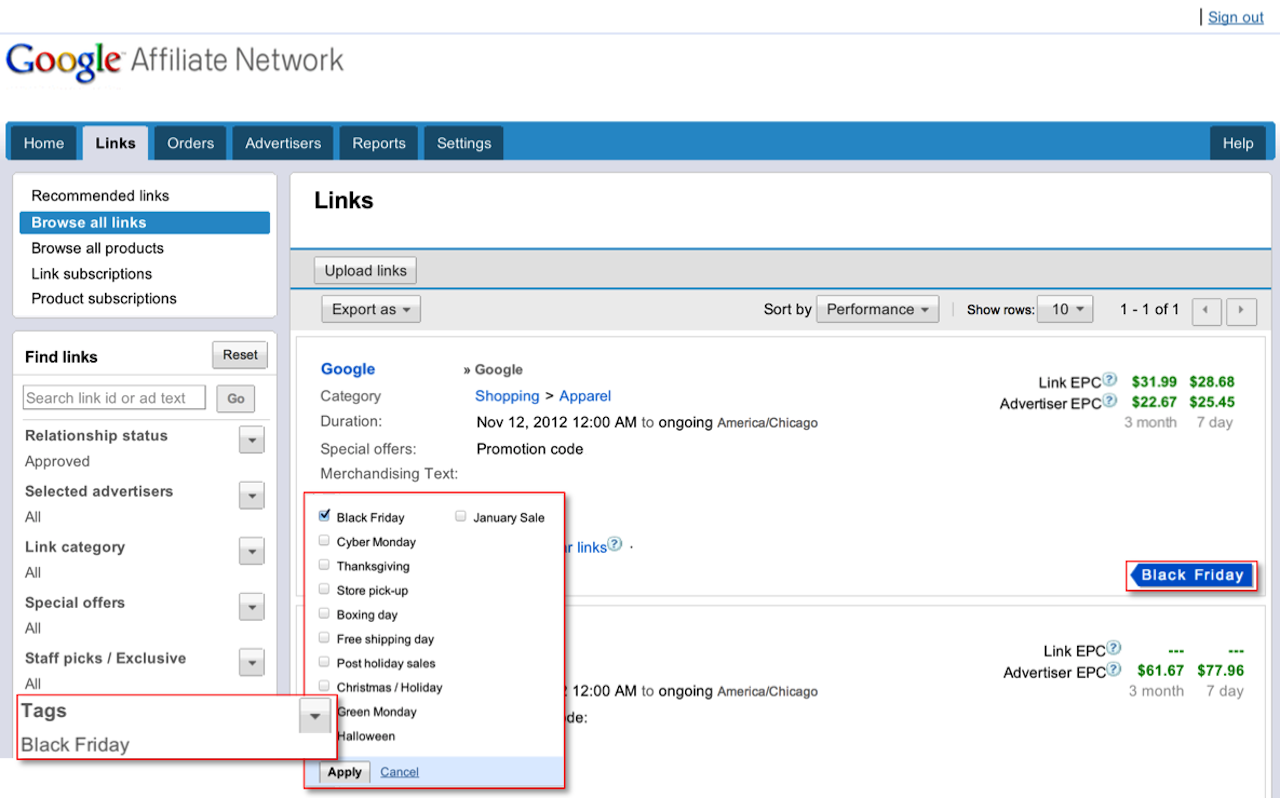
To add seasonal tags to your links, Click the 'Links' tab, then 'Browse all links'. Find the links you want to tag and check the box to the left of each link. Next, select the ‘Tag’ button at the top of the page, choose any appropriate seasonal tags, and click 'Apply'.


It's easy to share your newly-tagged links with publishers. Click ‘Share’ at the top of the page to get a link you can share with your joined publishers. Then, share the link via email with any publishers in your program so that they can easily view the seasonal links you just tagged.

On behalf of the engineering team, we want to wish you a happy holiday season. If there’s anything more we can do to help, please let us know in our Product forum.

Posted by:
Ali Pasha, Product Manager

Rabu, 07 November 2012

Introducing new reporting enhancements

We made a few updates to our reports over the past few weeks which include features useful for both advertisers and publishers. These new reports include Order-level payment reports for publishers, Multi-metric reports for comparing performance across different metrics and timeframes, and Geography reports to help both advertisers and publishers understand more about where user clicks and conversions are coming from.

Order-level payment reports

With our new Order-level payment reports, publishers can easily see which conversions their accounts have received payment for. Order-level payment reports contain a comprehensive listing of conversions that show the month in which conversions were paid out.

Order level payments

When you view the report, you'll first see order-level payment information for your advertiser relationships from the month when you received payment. The report pulls this information based on the timeframe you specify, so you can access order-level payments from the past.

Multi-metric graph reports

Multi-metric graphs allow you to quickly see performance across two separate axes. Set the graphs to review metrics based on the previous week or previous year’s performance for a specified time frame to identify changes in performance. You can also review against specific metrics, such as Publisher fees, clicks, conversions, and more.


Geography reports

With Geography reports, you can gain insights into where user performance originates from, in most cases down to the state or province level. See performance volume by geographic region so you can optimize and refine your affiliate program. You can review geographic locations associated with clicks, actions, transactions, sales, and more.

To get started, select your desired metrics and time frame above the world map. All metrics will populate in the table below.


If you have feedback or suggestions on these new reporting features, let us know what you think by submitting feedback in the interface, or through our Product forum.

Posted by:
Kurt Spoerer, Product Manager

Kamis, 25 Oktober 2012

Introducing the Manage Inquiries tab for advertisers

Many savvy shoppers shop online through loyalty and reward programs, since their purchases can lead to incentives like miles, points, or other reward-based currencies (typically referred to as a passback).

As an advertiser, you know how important it is to make sure customers are satisfied with their purchases. If they shop through loyalty programs, you also know how it’s important that they receive their passback. To that end, you may sometimes be contacted by loyalty publishers' customer service teams asking to confirm orders for customers who may not have received their passback. To ease this process, we've released the new Manage Inquiries tab to streamline the order lookup and resolution process so you can quickly review and take action on inquiries.


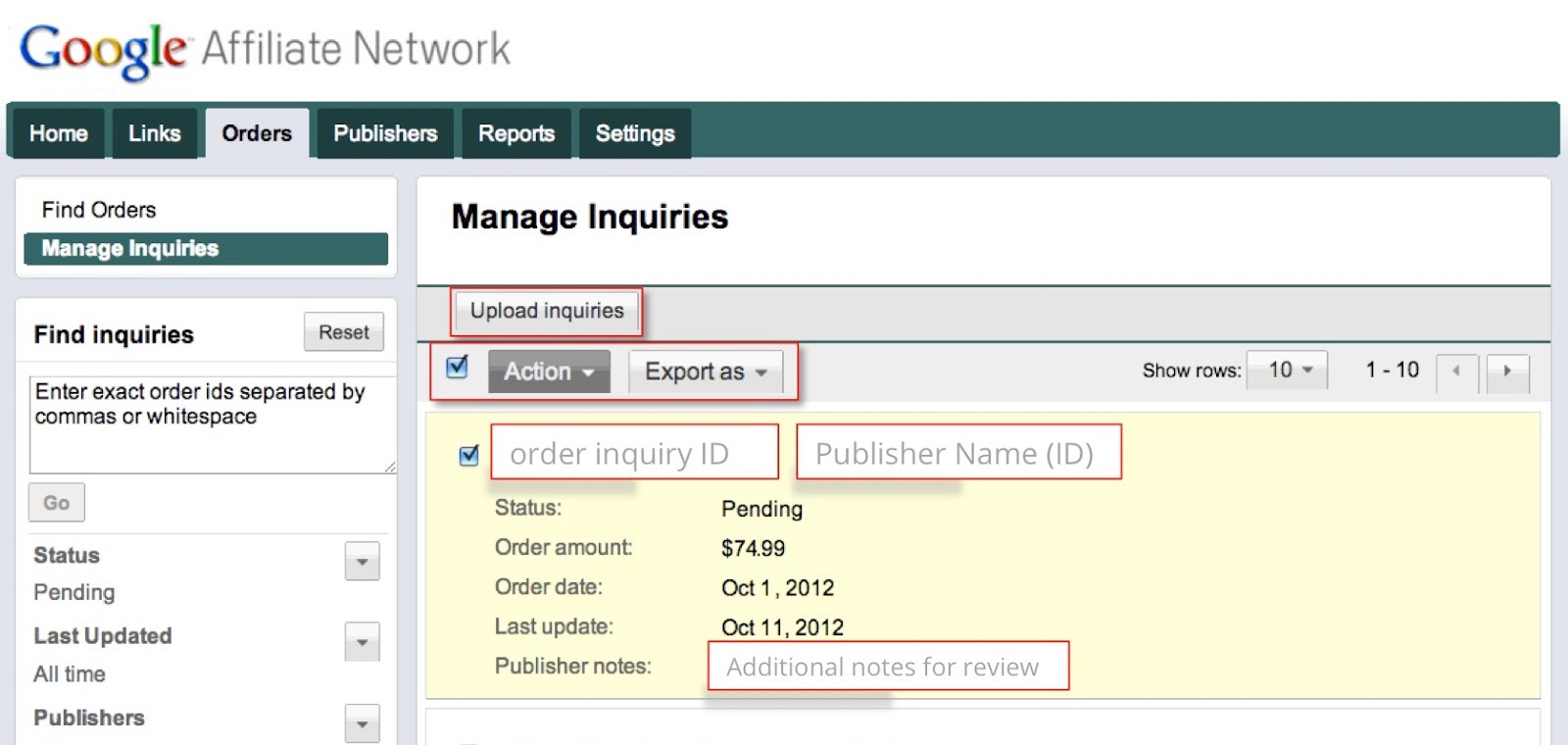
The Manage Inquiries tab shows all pending order inquiries, and publishers also have the option to provide notes to help you research and take action on the inquiry. You’ll also receive a weekly notification email if a publisher has added an inquiry to your account.

Reviewing inquiries
You can start reviewing inquiries by taking the following steps:
  1. Click on the Orders tab, then the Manage Inquiries sub-tab.
  2. Review the list of Pending inquiries.
  3. Review your own reporting to decide whether or not the inquiry is already associated with a valid order.
  4. Click on the Action drop-down and take the appropriate action on the inquiry. You can select the order and approve it as-is, or edit the order amount and approve, or decline the inquiry. You can also use the “select all” function to take action on multiple inquiries at once.
If you have a large number of inquiries, you can save time by exporting them to .csv, specifying the actions in the file and uploading it to the interface.

Learn more about managing pending order inquiries in the Help Center.

Posted by:

Gabe Black, Software Engineer
Mark St. John, Software Engineer

Rabu, 17 Oktober 2012

Join our holiday season advertiser webinar

Believe it or not, the holiday season is almost here. If you’re interested in making the most of Holiday 2012 for your affiliate program, join our free webinar hosted by Google Affiliate Network experts to help you plan and strategize for the busiest shopping season of the year.

We’ll be hosting this webinar three times over the next few weeks:

Session 1: Thursday, October 18th at 9:30 AM PT / 11:30 AM CT / 12:30 PM ET Join

Session 2: Wednesday, October 31st at 11:00 AM PT / 1:00 PM CT / 2:00 PM ET Join

Session 3: Thursday, November 8th at 12:00 PM PT / 2:00 PM CT / 3:00 PM ET Join

Our holiday season advertiser webinar is designed to arm you with the tools you need to get the most out of your affiliate spend for the holidays and navigate the season successfully. Come and learn tips and tricks on how to optimize your program for continued success.

Posted by:

Josh Pyle, Associate Product Marketing Manager

Kamis, 11 Oktober 2012

Beauty Encounter launches an affiliate program to achieve branding and direct response goals

Over the past few years, Google Affiliate Network has helped advertisers and publishers grow their businesses with the right mix of technology, service, and data insights. We’re pleased to share these stories with you on our blog.

Beauty Encounter is a specialty retailer who has earned a reputation as a popular shopping destination for affordable beauty and fragrance products. Founded in 1999 and based in Fountain Valley, CA, they evolved from a family-run wholesaler to an online fragrance retailer. As their online business developed, they wanted to increase their brand exposure and reach new customers while trimming their cost per customer acquisition. They launched an affiliate program in June 2011 to achieve these goals.

For Chief Technology Officer Thu Truong and her team, affiliate marketing ended up playing a vital role in the growth of their e-commerce efforts. Not only have they acquired new customers at a desirable cost, but they have also expanded their online presence. Truong states that their affiliate program has “given us access to productive affiliates, which is like having tens to hundreds to thousands of marketers spread knowledge of our brand name to online shoppers who normally would not know about Beauty Encounter and what we have to offer.” Throughout the first months of launch, the Beauty Encounter team established a solid set of publishers to achieve their branding and direct response goals.

In addition to analyzing performance and recruiting new publishers, Beauty Encounter launched an incentive program to motivate their top publishers. Truong explains, “We offered higher commission rates and exclusive offers to affiliates with a strong track record of driving sales for us. The incentive program motivated our top publishers to increase exposure of our brand and promotions, and really allowed these partnerships to flourish.” In the end, the results spoke for themselves. After just five months, Beauty Encounter saw their affiliate conversion rate increase by over 7%, ultimately helping to boost their total online sales by 7% as well.

To learn more about Ms. Truong and the Beauty Encounter affiliate program, read the full case study.

Posted by Will Heidrich, Account Manager

Kamis, 06 September 2012

Creating better relationships and improving productivity

We’ve been amazed at the adoption of the recommendation engine, a new tool that helps advertisers and publishers find new relationships and links based on relevance and revenue potential. Google Affiliate Network now sees over half of all new relationships being created from our recommendations. Today, we’re excited to share new enhancements that further simplify the process of creating relationships and getting links.

For publishers:

Creating relationships
The Advertisers tab includes three sub-tabs to help you easily sort through new opportunities.


  • Recommended is now the default view for the Advertisers tab, featuring a customizable list of available advertiser programs that Google algorithms predict may be a good fit for you.
  • Invitations are from advertisers that want to work with you -- including those with private programs. To join, just click the ‘Join’ button for that invitation.
  • Browse existing shows the status of advertiser programs you’ve already applied to.
Getting the best links
The Links tab features recommendations for links that we estimate will perform well for you, and we now include new criteria for recommendations, like Staff picks and Exclusive opportunities. You can still view ‘Browse all links’ to search for links as normal. You'll also notice three new sub-tabs – we've consolidated Products and Subscriptions under the Links tab.


  • Recommended links are ranked primarily based on average earnings.
  • Staff picks are curated by Google Affiliate Network account teams based on relevant performance or seasonality.
  • Exclusive opportunities feature links only available through Google Affiliate Network.
For advertisers:

Creating relationships
The Publishers tab includes three sub-tabs to help you easily sort through high-potential publishers that may be a good fit for your program.


  • Recommended is now the default view for the Publishers tab. New search filters enable you to quickly narrow down the list of publishers that are a good fit.
  • Pending makes it easy for you to review publishers and quickly approve them in bulk. We sort publishers by relevance to help you approve the best recommendations first.
  • Browse existing shows the status of publishers that you’ve already taken action on, as well as any non-joined publishers you can recruit.
Please let us know what you think by posting a comment here or in the Google Affiliate Network forum.

Posted by:
Ali Pasha, Product Manager
Robin Anil, Software Engineer

Rabu, 15 Agustus 2012

Launched: Switch between your preferred currency and timezone

With our international launch earlier this year, we enabled you to set your preferred currency and timezone. We’re pleased to announce that if you changed your settings, you can now switch between your preferred settings and the default currency (USD) and timezone (Central Time) when viewing reports. This enhancement allows you to view your reports in the format that's most relevant to you, and is available for all reports except for payment reports.

 Switch between your preferred and default currency:

Switch between your preferred and default timezone:

If you're a Google Affiliate Network publisher, please note that you can only view the reporting currency you’ve chosen in your AdSense account. It’s not possible to change this once you’ve set it.

Posted by: Kurt Spoerer, Google Affiliate Network Product Manager

Rabu, 08 Agustus 2012

Recommending the most relevant advertisers, publishers, and links

Over the past year, we've heard from publishers and advertisers that they want a network that can help them create meaningful relationships. We've listened, and today, we've released a completely new recommendation engine that redefines how you can find and take advantage of affiliate marketing opportunities.

Publishers can find advertiser recommendations under the Advertisers > Recommended advertisers sub-tab. This is where they can find a list of available programs ranked based on relevancy and predicted performance. Each recommendation also shows why the recommendation was made, along with an estimate of earnings potential for that advertiser. We display advertiser recommendations based on the criteria below:
  • Similar category: Advertisers are ranked by relevancy to your publisher category.
  • Revenue potential: Advertisers are ranked primarily based on estimated payout fees.
In addition to the average advertiser EPC, each recommendation has an estimated advertiser EPC. Estimated EPC is a brand new metric designed to help publishers understand how much they could potentially earn with that advertiser.


Advertisers can now see publisher recommendations, too. Using the recommendation engine, the Publishers > Recommended publishers sub-tab shows a list of publishers that Google algorithms recommend as a good fit based on similar categories and revenue potential.


We've also brought the power of recommendations to the Links tab to help publishers find and promote the most relevant ads with the highest performance potential. Under the Links > Recommended links sub-tab, we display recommended text and banner links that Google algorithms predict may perform best for each individual publisher.


For more details, we suggest reviewing these Help Center articles:
Sign in to your account and try out recommendations. After you’ve taken a few minutes to review, we’d love to hear from you in our forum.

Posted by:
Ali Pasha, Product Manager
Robin Anil, Software Engineer

Senin, 25 Juni 2012

New enhancements to Google Affiliate Ads for Blogger

Back in April, we introduced Google Affiliate Ads for Blogger, a gadget that enables Blogger users to easily monetize their blogs through Google Affiliate Network and helps advertisers scale relationships with content blogs. We’ve received positive feedback about this gadget from participating advertisers and Blogger users, and wanted to let you know about a couple of recent enhancements we’ve made:


  • Additional advertisers: This program is now available to more advertisers. In order to participate, advertisers must provide a Merchant Center feed and consent through an email agreement.
  • Additional categories of blogs: All Blogger users located in the US with an AdSense account can now sign up for Google Affiliate Ads for Blogger. Participating advertisers can see performance at the category and blog level via the ‘Reports’ tab in the Google Affiliate Network interface.

Here are two examples of a Blogger user finding a relevant affiliate ad:


If you’re an advertiser interested in participating in Google Affiliate Ads for Blogger, please reach out to your Google Affiliate Network account team or submit an inquiry if you’re not already working with us. If you’re a publisher, learn more about posting affiliate ads to your blog.

Posted by:
Ali Pasha, Product Manager

Kamis, 14 Juni 2012

Announcing new UK advertisers

We’re excited to let you know that 30+ UK advertisers have recently launched affiliate programmes with Google Affiliate Network. For publishers with UK audiences, these programmes represent a new opportunity to earn incremental revenue for your website.

Just a few of our newly-launched advertisers include:

Follow these steps to apply to UK programmes:
  1. Log in to your account (or apply to join our network)
  2. Go to the Advertisers tab
  3. On the left-hand navigation, click 'Relationship status' and choose 'Available'
  4. Click ‘Countries’ and choose United Kingdom
  5. Apply to programmes

If you’re an advertiser interested in starting an affiliate programme with Google Affiliate Network, please contact us.

Posted by: Tony Nelan, Head of Google Affiliate Network for Europe

Senin, 11 Juni 2012

Connecting shoppers and great stores online

(Cross posted to the Official Google Blog)

Online shopping is great for many reasons, but most of all it’s a convenient and fast way to turn your intent to buy that new pair of running shoes, for example, into an actual purchase. But shoppers tell us they’re often nervous about buying from online stores they don’t know. We created the free Google Trusted Stores program to help solve this problem. When shoppers see the Google Trusted Store badge, they know in a snap they’re shopping with a reputable retailer and they can feel confident making an informed purchase.

We’ve been testing the program since last fall with about 50 online merchants and more than 10 million orders. It’s working even better than we hoped, generating positive feedback from shoppers and increasing sales for merchants. Starting today, Google Trusted Stores is open to all U.S. merchants who want to apply. 


Helping shoppers choose stores they can trust
When shopping online, you may come across the Google Trusted Store badge. Hover over it and you’ll see a “report card” which shows “grades” for that merchant’s shipping and service, including more precise metrics about what the grades mean. 
The Google Trusted Store badge and report card

This badge is only awarded to online stores that deliver a great overall experience, so even if you haven’t shopped with this merchant before, you can easily tell if they are trustworthy, ship quickly and reliably, and offer exceptional customer service. If there’s a problem with your purchase, we’re here to help. When you buy from a Google Trusted Store, you can opt in to get up to $1,000 lifetime purchase protection per shopper. And our dedicated customer service team is there to work with you and the merchant to assist in resolving the issue.

Helping merchants demonstrate their excellence and earn new business
Google Trusted Stores helps online stores attract new customers, increase sales and differentiate themselves by showing off their excellent service via the badge on their websites. Soon the badge will also appear on Google.com ads and in Google Shopping results.


Google Trusted Store badge on AdWords

Over the last nine months of the pilot, our tests show that participating in this program can help merchants big and small. For example, Wayfair, the largest online-only retailer of home goods and one of the top 50 largest online retailers as ranked by Internet Retailer, increased sales* on its site by 2.3 percent with Google Trusted Stores. And Beau-coup, a specialty online favors and gifts retailer, saw an 8.6 percent increase*. Take a look at our merchant success stories to learn more about how Google Trusted Stores has had a positive impact on website conversion rates and average order sizes for online retailers. 

Google Trusted Stores is entirely free, both for shoppers and for online stores. We’re still testing the most helpful ways to display Trusted Stores information to shoppers, so you may see different versions, or none at all, while we conduct experiments. If you’re a merchant and would like to participate in the Google Trusted Stores program, please apply. 


*Increased sales percentages are based on a combination of uplift in conversion and average order size.

Rabu, 07 Maret 2012

The importance of community policing

Google Affiliate Network works hard to ensure a high quality network for advertisers, publishers, and users. In addition to our integration with AdSense and the safety net you get with Google’s cross-product security and fraud prevention efforts, advertisers and publishers must adhere to our terms of service and program policies.

We also get a lot of great input from the affiliate community via our help forum and other feedback channels. We believe that community policing is an important part of a healthy, high-quality network and review every entry that comes in through our ‘Report a Violation’ form. We encourage you to use this form to report abusive or suspicious publishers who may be in violation of our program policies or terms of service around site content, traffic sources, or our software guidelines.

Posted by Matt Dougherty, Network Quality

Kamis, 23 Februari 2012

Faster, better order management

Since migrating to the Google stack last September, we’ve been working to improve the Google Affiliate Network interface by both adding new features and enhancing some existing ones.

As a part of that effort, we’ve just pushed out a brand new release of the Orders tab for both advertisers and publishers.

First, we've made the Orders tab fast. Very fast. Whether you’re looking up 10 orders or 10,000 orders, you'll see query results load in about the same amount of time.

Advertiser-facing changes:
We want to make it easier for you to handle bulk operations. So, we enabled inline order editing right from the Orders tab. No need to click through to another page -- you can simply edit the order inline. Once an order is updated, publisher and network fees are updated, too.

Also, it’s now easier to cancel orders in bulk. When you search for multiple orders, just select the orders you want to cancel and cancel them all at once.
Publisher-facing changes:
The key publisher feature we’ve added is the ability to directly edit the Member ID field for an order inline. If you're a publisher whose workflow involves verifying or editing the Member ID field, this process will now be much easier.

Finally, based on your feedback, we now display locked orders (e.g. those that have been paid out) in the tab, rather than just open orders. Keep in mind though that those locked orders can't be edited.

As always, we look forward to your feedback. Please use our forum for feedback and comments. Thanks!

Kamis, 16 Februari 2012

Abt.com transitions to Google Affiliate Network and grows revenue 119%

Over the past few years, Google Affiliate Network has helped advertisers and publishers grow their businesses with the right mix of technology, service, and data insights. We’ll be sharing these stories on the blog over the coming weeks. 

Today, we turn the spotlight to Abt.com, an online electronics retailer based just north of Chicago in Glenview, IL. Since launching in 1998, Abt.com has climbed to #151 on Internet Retailer’s list of America's top retail websites. The Abt.com team came to Google Affiliate Network in 2008 with three objectives: to grow online sales, reach new customers, and expand their existing reach across top affiliate publishers.

Steve Tazic, Abt.com’s Director of eCommerce Marketing, transitioned the company’s affiliate program to Google Affiliate Network based on the platform’s ease of use, automation, robust quality controls and advanced reporting. With less time spent managing processes, Steve collaborated with his Google Affiliate Network account team to optimize key relationships and implement best practices. Just a few highlights include:

  • Data-driven optimization: The Abt.com team used advanced reports to “reach out to publishers in different situations when numbers are good or bad to try and capitalize on opportunities. For example, we can easily pinpoint publishers who have dropped off in sales and know exactly who to contact to get them back on track.”
  • Take advantage of platform efficiency: “The Google Affiliate Network platform automates processes for creating ads, pinpointing potential new affiliates and recognizing current affiliates that need attention, whether it be good or bad. One big time saver is that we were able to automate the reconciliation process which we used to do manually.”
“Since coming from our previous network, we have seen average monthly revenue increase 119%. We have better relationships with each publisher and feel it is easier to get our offers out to our publishers. The affiliate channel now represents 15% of our online business.” - Steve Tazic, Abt.com’s Director of eCommerce Marketing 

Learn more by reading the full case study.

Posted by Will Heidrich, Account Manager

Kamis, 04 Agustus 2011

New look for Google Affiliate Network's website

This week, we launched a new look for Google Affiliate Network's website. In addition to a refreshed design, we've added new features to provide you with fresh product updates, educational resources, success stories, and more.


New features:
Throughout the website, you'll find diverse stories of advertisers, publishers and partners who have succeeded with Google Affiliate Network. We hope they inspire you and that you'll share your story with us, too.

Check out the new website and tell us what you think!